
INTRODUCTION
Have you ever sat and gazed at that blank screen and wondered how you are going to create your first freelance portfolio?
You’re not alone. I recall that I was totally paralysed when I attempted to make my first portfolio five years back. I possessed skills, ideas, and passion, but no idea of how to portray them on the internet.
The following is the reality: Your freelance portfolio is your key to getting actual clients. It is not merely a website. It is your 24/ 7 salesperson ,and he/she is working when you are sleeping.
Here, in this guide, I will take you through 15 real-world freelance portfolio examples for beginners that get clients and are real-life. You will discover what works, what does not, and just how to construct your own- even when you have never dealt with web design.
Let’s dive in!
QUICK ANSWER BOX
What makes a great freelance portfolio for beginners? There should be a good portfolio of the best samples of work, a clear description of services, testimonials from clients (even of the practice projects), a convenient method of contact, and a professional photo. Put emphasis on quality, not quantity and present outcomes, rather than pretty designs.
Why Your Freelance Portfolio Matters More Than Your Resume
Ok, I will tell you the truth.
Customers do not bother about your college education or your resume. They do not mind anything. Can you help them?
Your portfolio will provide the answer to this question immediately.
You can think about it in the following way: Would you employ a wedding photographer without having a glimpse of his/her photos? Of course not! The same reasoning can be applied to all the freelance jobs.
Here’s what happens when you have a strong portfolio:
- Clients trust you faster (even as a beginner)
- You can charge higher rates immediately
- You stand out from 90% of other freelancers
- You spend less time convincing and more time working
A study by Upwork showed that freelancers with complete portfolios get 3x more client responses than those without.
That’s not just a number. That’s real money in your pocket.
15 Freelance Portfolio Examples That Inspire Action
I would like to demonstrate to you the real examples that work. These have been divided according to profession so that you can locate ones based on your skills.
1. Sarah Chen – Freelance Writer Portfolio
Sarah’s portfolio lives on a simple one-page website. Here’s what makes it brilliant:
- Homepage headline: “I help tech startups explain complex ideas in simple words”
- 3 writing samples with clear results (“This blog post generated 10K visitors”)
- Client logos from recognized brands
- Simple contact form (no clutter)
What you can steal: Her results-focused approach. She doesn’t just show articles—she shows impact.
2. Marcus Johnson – Graphic Designer Portfolio
Marcus uses Behance (free!) to showcase his work. His secret?
- Before/after comparisons of logo designs
- Case studies explaining his design thinking
- Mobile-friendly layout (60% of clients browse on phones)
- Clear pricing on a separate page
Beginner’s Note: You don’t need expensive software. Marcus started with Canva and free Behance hosting.
3. Elena Rodriguez – Social Media Manager Portfolio
Elena’s portfolio website shows screenshots of actual growth metrics:
- Instagram account grew from 500 to 15K followers
- Engagement rate improvements (with graphs!)
- Real comments and testimonials from followers
- Video testimonials from happy clients
Pro Tip: Numbers speak louder than words. Even small wins (like growing an account by 500 followers) prove you know your stuff.
4. James Park – Web Developer Portfolio
James keeps it technical but digestible:
- Live links to websites he’s built
- GitHub repositories showing his code
- Problem-solution format for each project
- Tech stack clearly labeled (WordPress, React, etc.)
What works: He explains technical stuff in plain English. No jargon overload.
5. Priya Sharma – Virtual Assistant Portfolio
Priya’s portfolio is brilliant in its simplicity:
- Services menu (email management, scheduling, research)
- Time-saving stats (“Saved clients 15 hours per week on average”)
- System screenshots (showing her organization tools)
- Availability calendar built right in
Common Mistake to Avoid: Don’t list every skill ever. Priya focuses on her top 3 services.
6. Tyler Brooks – Video Editor Portfolio
Tyler embedded his work directly on his site:
- 3-minute showreel on the homepage
- Individual project pages with client interviews
- Style variety (corporate, creative, documentary)
- Quick turnaround badge (“48-hour edits available”)
Why it works: Clients can judge his work in 3 minutes flat.
7. Aisha Mohammed – SEO Specialist Portfolio
Aisha built trust through transparency:
- Ranking screenshots (before/after Google positions)
- Traffic graphs from Google Analytics
- Client websites she’s optimized (with permission)
- Free SEO audit offer to attract leads
Smart move: Her free audit converts 30% of visitors into paying clients.
8. Daniel Lee – Photographer Portfolio
Daniel uses a visual-first approach:
- Full-screen photo galleries organized by category
- Minimal text (photos do the talking)
- Instagram feed embedded on the site
- Booking calendar for sessions
Platform he uses: Format.com (designed specifically for photographers)
9. Rachel Kim – UX/UI Designer Portfolio
Rachel showcases thinking, not just pretty screens:
- Design process documented step-by-step
- User research findings included
- Wireframes to final design progression
- Interactive prototypes that visitors can click through
What beginners miss: The process matters as much as the final product.
10. Carlos Mendez – Voice-Over Artist Portfolio
Carlos makes listening easy:
- Audio samples organized by style (commercial, narration, character)
- Equipment list (shows professionalism)
- Accent/language options clearly stated
- Same-day delivery badge for urgent projects
Key takeaway: Make it stupid-simple for clients to hear your work.
11. Hannah Wong – Interior Designer Portfolio
Hannah uses Pinterest-style layouts:
- Room transformations with before/after sliders
- Budget breakdowns (shows she works with real constraints)
- 3D renderings next to finished spaces
- Client location map (proves local expertise)
Portfolio tool: She built this on Wix in one weekend.
12. Jamal Carter – Content Creator Portfolio
Jamal aggregates everything in one place:
- YouTube channel embedded
- Blog post links with view counts
- Podcast appearances listed
- Social media stats dashboard
His genius move: He updates stats monthly to show ongoing growth.
13. Sophie Anderson – Translator Portfolio
Sophie overcomes the “invisible work” challenge:
- Document samples (with client permission)
- Language pairs prominently displayed
- Certification badges (prove credentials)
- Industry specializations (legal, medical, technical)
Trust builder: She includes her certification numbers that clients can verify.
14. Omar Hassan – Animation Portfolio
Omar makes his portfolio interactive:
- Animated logo on page load
- Process GIFs showing his workflow
- Client testimonials as animated quotes
- Download-free viewing (all hosted on site)
Platform: Adobe Portfolio (free with Creative Cloud)
15. Lucy Martinez – Copywriter Portfolio
Lucy focuses on conversion:
- Sales page examples with conversion rate improvements
- Email sequence samples (showing open rates)
- Landing pages she’s written (with A/B test results)
- Niche focus (SaaS companies only)
Why she wins: Specialization beats generalization every time.

Best Freelance Portfolio Sites to Build On
There is no need to code by hand. The following are the top freelance portfolio websites that amateurs actually utilize:
| Platform | Best For | Price | Ease of Use | Customization |
|---|---|---|---|---|
| Wix | All-round freelancers | Free-$16/mo | ⭐⭐⭐⭐⭐ | ⭐⭐⭐⭐ |
| WordPress.com | Writers, bloggers | Free-$25/mo | ⭐⭐⭐ | ⭐⭐⭐⭐⭐ |
| Behance | Designers, artists | Free | ⭐⭐⭐⭐ | ⭐⭐⭐ |
| Format | Photographers | $8-$16/mo | ⭐⭐⭐⭐⭐ | ⭐⭐⭐⭐ |
| Contently | Writers | Free | ⭐⭐⭐⭐ | ⭐⭐ |
| Dribbble | UI/UX designers | Free-$12/mo | ⭐⭐⭐⭐ | ⭐⭐⭐ |
| Journo Portfolio | Journalists | Free-$120/yr | ⭐⭐⭐⭐ | ⭐⭐⭐ |
| Squarespace | Creative professionals | $16-$49/mo | ⭐⭐⭐⭐ | ⭐⭐⭐⭐ |
My Honest Recommendation
Wix or WordPress.com is recommended when you have a small business.
The reason is this: They are free to begin with, stupid-easy to use ,and you can upgrade later when you are making money.
My initial writing portfolio was created on a free plan of WordPress.com. It was good enough to get my first $500 customer. That’s all that matters.
Pro Tip: The platform you select should be mobile-friendly, whichever platform you use. More than two-thirds of the clients will access their portfolio through their phones.
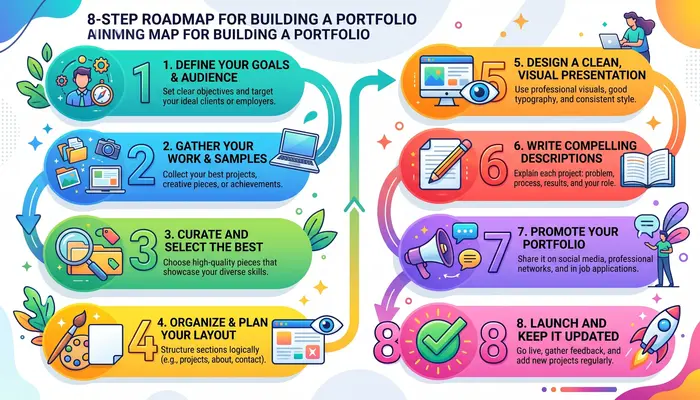
How to Build a Freelancer Website Portfolio (Step-by-Step)
Okay, enough examples. Ready to create your portfolio?
Grab a coffee. You can follow along, and this will take approximately 2 hours.
Step 1: Choose Your Platform (10 minutes)
Pick one platform from the table above. Don’t overthink this.
- Writers: WordPress.com or Contently
- Designers: Behance or Dribbble
- Photographers: Format or Squarespace
- Everyone else: Wix
Sign up for the free version. You can always upgrade later.
Step 2: Select a Clean Template (15 minutes)
Here’s the thing: Less is more.
Choose a template with:
- Lots of white space
- Simple navigation
- Clear headings
- Portfolio/gallery section
- Contact form
Avoid templates with animations, pop-ups, or fancy effects. They distract from your work.
Common Mistake: Beginners pick the fanciest template. Don’t. Pick the cleanest one.
Step 3: Write Your Homepage Headline (20 minutes)
This is the most important sentence on your entire site.
Use this formula:
“I help [target client] achieve [specific result] through [your service].”
Examples:
- “I help busy entrepreneurs manage their inbox and reclaim 10 hours per week”
- “I help food brands tell delicious stories through mouth-watering photography”
- “I help SaaS startups explain complex products in simple words”
See the pattern? It’s not about YOU. It’s about what you do for THEM.
Step 4: Create Your “About” Section (30 minutes)
Keep it short (150-200 words max).
Include:
- Who you are (1 sentence)
- What you do (2 sentences)
- Why do you do it? (1 sentence)
- Your unique angle (1 sentence)
- A friendly photo of yourself
Example:
“Hey! I am Sarah, a freelance graphic designer, and I like assisting small businesses to be bigger than they are.
I have been working on brand identities of startups with small budgets and have been doing it for the past 3 years. My designs are simple, catchy, and (above all) cheap.
My background in designing logos for some of my friends in business started me in the world of freelancing because I realized that I could convert my hobby into a profession.
When I am not designing, I am out and about hiking with my rescue dog or working on sourdough (yet I still have not mastered it!).
So amiable and human, that is.
Step 5: Add Your Best 3-5 Work Samples (45 minutes)
Quality beats quantity every single time.
For each work sample, include:
- Project title (e.g., “Logo Design for Eco-Friendly Coffee Brand”)
- The challenge (what problem did the client have?)
- Your solution (what did you create?)
- The results (what happened after?)
- Visual proof (images, screenshots, links)
Beginner’s Note: Don’t have real client work yet? Use practice projects, volunteer work, or self-initiated projects. I’ll show you how to get these in a later section.
Step 6: Create a Services/Pricing Page (20 minutes)
Be crystal clear about what you offer.
List your services like this:
Logo Design
- Custom logo concepts
- 3 revision rounds
- Final files in all formats
- Starting at $300
Brand Identity Package
- Logo design
- Color palette
- Typography guide
- Brand guidelines
- Starting at $800
Pro Tip: Use “Starting at” pricing rather than exact numbers. It gives you flexibility to adjust based on project scope.
Step 7: Add a Contact Form (10 minutes)
Make it ridiculously easy to hire you.
Your contact form needs just 4 fields:
- Name
- Project description
- Budget (optional but helpful)
Include your email address too, for people who prefer that.
Add this line: “I typically respond within 24 hours on weekdays.”
Setting expectations builds trust.
Step 8: Polish and Publish (10 minutes)
Before you hit publish:
✅ Check every link works
✅ Read everything out loud (catches awkward phrasing)
✅ View on your phone (does it look good?)
✅ Test the contact form (send yourself a test message)
✅ Run a spell check
✅ Add your social media links
Then hit publish!
Celebrate this moment. You just built something 90% of aspiring freelancers never do.
Portfolio Website Examples by Category
Different freelance jobs need different portfolio approaches. Let’s break this down.
Art Portfolio Examples
If you’re an artist or illustrator, your portfolio should be a visual feast.
What to include:
- High-resolution images of your artwork
- Variety of styles (but stay coherent)
- Process shots (sketches, work-in-progress)
- Dimension and medium details
- Available for purchase/commission info
Platform recommendation: Behance, ArtStation, or Cargo Collective
Real example: Check out Loish.net – she’s an illustrator who beautifully showcases her range while maintaining a consistent style.
Architecture Portfolio Examples
Architecture portfolios need to balance creativity with technical skill.
Must-haves:
- Project photos (exterior and interior)
- Technical drawings or floor plans
- 3D renderings
- Sustainability/materials information
- Collaboration credits (be honest about team projects)
Format tip: PDF portfolios still matter in architecture. Create both a website and a downloadable PDF version.
Writing Portfolio Examples
Writers face a unique challenge: how do you showcase writing without overwhelming visitors?
The solution:
- Featured articles (3-5 of your absolute best)
- Categorize by topic or content type
- Include publication names (builds credibility)
- Show versatility without being scattered
- Add a downloadable résumé
Internal linking opportunity: Create separate pages for “Blog Writing Samples,” “Technical Writing,” and “Copywriting” if you do multiple types.
Pro Tip: Always link to published work rather than copying full articles to your site. Google penalties for duplicate content are real.
Interior Design Portfolio
Interior designers need to show transformation.
What works:
- Before/after sliders (these are addictive to browse!)
- Room-by-room galleries
- Style guides for each project
- Client testimonials with photos
- Budget range indicators
Software recommendation: Houzz and Prandor Format both cater specifically to interior designers.
Graphic Design Jobs Portfolio
Graphic designers have endless options, which can be overwhelming.
Keep it focused:
- Show 10-15 of your BEST projects (not everything you’ve ever made)
- Organize by project type (branding, print, digital)
- Include mockups (show designs in context)
- Explain your design decisions
- Keep layouts clean (ironic when designers overcomplicate their own sites!)
Common mistake: Don’t just dump images. Tell the story behind each project.
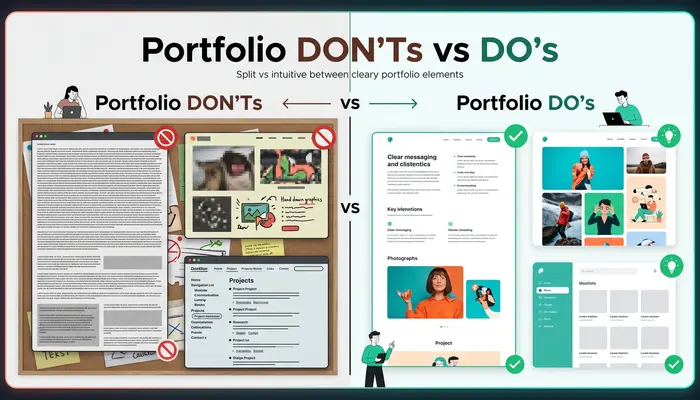
Common Mistakes That Kill Beginner Portfolios
Spare me the errors I made (and beheld always).
Mistake #1: The “Everything and the Kitchen Sink” Approach
There is no need to demonstrate all the projects that you have ever touched.
I have also added a PowerPoint presentation, which I created at college, to my portfolio. Big mistake. It watered down my professional activity.
Fix: Display your 3-5 top works. Period.
Quality > Quantity. Always.
Mistake #2: Zero Context for Projects
You have todo more than merely paste pictures on a page.
The clients are interested in knowing:
- What was the problem?
- What did you do?
- What were the results?
Remedy: Compose 3-4 sentences on each project describing the situation.
Mistake #3: Ignoring Mobile Users
The following stat will make you sit up: Freelance portfolio views on mobile devices occur 68 percent of the time.
In case your portfolio appears to be broken on phones, you are losing business.
Fix: NEVER post your portfolio without first viewing it on your phone.
Mistake #4: Making Contact Difficult
I have viewed portfolios with a three-click contact information and treasure map.
Fix: Include your contact details in the footer and the header of each page. Ensure that it cannot be missed.
Mistake #5: Using Low-Quality Images
Pixelated images and blurred pictures shout amateurism.
Fix: High-resolution pictures. In case you are presenting the design of the websites, clean screenshots or mockup generators such as Smartmockups can be used.
Mistake #6: No Social Proof
Starting out without testimonials is tough; I get it. But zero social proof is a red flag.
Fix: Use testimonials from:
- College professors
- Volunteer organizations
- Practice clients (friends’ businesses)
- Beta projects
Something is better than nothing.
Mistake #7: Outdated Information
Your portfolio is not a set-and-forget.
I have friends who are still displaying work as of 2018. In internet time, that is old.
Fix: Change your portfolio at least every 3-4 months. Substitute weaker with new work that is stronger.
How to Get Projects for Your Portfolio (Zero Experience)
But I do not have any shown work!
I hear this EVVY Time. And I get it. The aage-olddilemma: You have to have experience to get clients, and you must have clients to gain experience.
The way to get out of the cycle is as follows:
Method #1: Create Mock Projects
Pick 3 fictional companies and create work for them.
Example for writers:
- Write a blog post for a fictional meal prep company
- Create an email sequence for an imaginary productivity app
- Draft social media posts for a fake eco-friendly clothing brand
Example for designers:
- Redesign a website you think is ugly
- Create a brand identity for a made-up coffee shop
- Design a poster series for invented music festivals
Key: Make them realistic. Research real companies in that industry so your mock projects look authentic.
Method #2: Volunteer Your Services
Local nonprofits ALWAYS need help and often can’t afford professionals.
- Animal shelters need photos
- Community centers need flyers
- Environmental groups need social media help
- Churches need website updates
You get real work for your portfolio. They get professional help. Win-win.
Pro Tip: Ask for a written testimonial before you finish the project. People forget when you ask months later.
Method #3: Freelance Websites for Quick Wins
Such websites as Upwork, Fiverr, and Freelancer are not only available to experienced freelancers.
Begin with ludicrously low prices in order to launch your initial 5 projects. I am speaking of 25-50 per project.
Yes, it is less than the market rate. However, you are not only making money but also buying portfolio pieces and testimonials as well.
Popular objection: “Would low prices be a blow to my reputation?
No. You are a novice, gaining experience. Be candid: New freelancer, portfolio building, introductory prices.
Clients respect honesty.
Method #4: Offer Free Samples to Dream Clients
This is bold, but it works.
Find 5 companies you’d LOVE to work with. Create something for them unrequested, then reach out:
Email template:
“Hi [Name],
I’m a new [your profession] building my portfolio, and I’m a huge fan of [their company].
I created [what you made] for you as a sample. No strings attached. It’s yours to use if you like it.
If you’re interested in more work like this, I’d love to discuss. If not, no hard feelings!
Best,
[Your name”
This worked for me with my third dream client. They hired me for a paid project two weeks later.
Expert Tips From Successful Freelancers
I contacted freelancers who earn 5K or more each month and inquired about their best portfolio advice.
This was the response to the following:
Tip 1: “Present, Not only Work” Amanda, $8K/month Content Strategist.
Early in my work, I provided blog posts; now I provide rising up of the traffic, an enhancement of conversions, an increase in ranking, and get clients excited.
Your next step: Even crude estimates are all that is required. This social media campaign resulted in the engagement being improved by about 40,% which is better than none.
Tip #2: “Specialize Visually Derek, $12K/month Web Developer.
Now I display e-commerce websites in my portfolio, and every time online store owners come to my site, they can look directly at the page and see that I understand their needs. My conversion rate doubled as I narrowed down visually.
Your action step: When you have a number of niches, make a separate portfolio page.
Hint #3: Video Beats Everything- Jasmine, 6K/month Video Editor.
I have included a 90-second video about myself on my homepage, and my inquiry rate increased 3-fold. People like to see your personality before employing you.
Your course activity: You will create a video on your simple smartphone presenting yourself. No equipment required.
tip #4: Before raising prices update your portfolio: Marcus, 10K/month Designer.
The reasoning behind my new rates is to refresh my portfolio each time I feel like raising my rates: I add my new, best work and remove old ones, which is a psychological justification both to me and to mme
Your action plan: Have a reminder on your calendar to check on your portfolio after every quarter.
TIP 5: “Create an Ideal client one page” – Sophie, $7K/month Copywriter.
I made a special landing page for SaaS founders in particular, and it performs 18x better than my general portfolio (4x). Specificity works.
Your homework: Who would be your ideal client? Develop a special page that addresses them.
Tools and Resources for Building Your Portfolio
Here’s my toolkit for creating professional portfolios on a budget:
Portfolio Building Platforms
| Tool | Best Feature | Price | Link |
|---|---|---|---|
| Wix | Drag-and-drop simplicity | Free-$16/mo | wix.com |
| WordPress.com | Powerful customization | Free-$25/mo | wordpress.com |
| Webflow | Design flexibility | Free-$14/mo | webflow.com |
| Cargo | Minimalist aesthetics | Free-$13/mo | cargo.site |
Image and Mockup Tools
- Canva: Free design tool (better than you think)
- Smartmockups: Device mockup generator ($0-39/mo)
- Unsplash: Free stock photos (Creative Commons)
- TinyPNG: Image compression (makes sites load faster)
Writing Tools
- Grammarly: Catches embarrassing typos (free version works great)
- Hemingway App: Simplifies your writing (free)
- Content: Portfolio specifically for writers (free)
Video Tools
- Loom: Quick screen recordings (free-$8/mo)
- Canva Video Editor: Simple video creation (free)
- Vimeo: Ad-free video hosting (free-$7/mo)
Analytics Tools
- Google Analytics: Track portfolio visitors (free)
- Hotjar: See how visitors use your site (free-$31/mo)
- Google Search Console: Monitor search performance (free)
External linking opportunity: Link to Google Analytics setup guide or Hotjar tutorial from reputable sources like HubSpot or Neil Patel’s blog.

Real-Life Case Study: From Zero to First Client in 30 Days
I would like to tell you the story of Ashley. She is a friend who became a paid client after one month as someone who was a complete beginner.
Background: Ashley had no professional experience in social media management, but aspired to work as a freelance social media manager.
Week 1: Portfolio Creation
- Built a simple Wix website (free plan)
- Created 3 mock Instagram content calendars for fictional brands
- Wrote a clear “About” section explaining her passion for social media
- Added a contact form
Week 2: Building Credibility
- Volunteered to manage Instagram for a local dog rescue (free)
- Posted her work-in-progress on LinkedIn
- Joined 5 Facebook groups for social media managers
- Updated portfolio with rescue shelter work (after 1 week of managing it)
Week 3: Outreach
- Sent personalized emails to 20 small local businesses
- Offered a free audit of their current social media
- 5 responded positively
- 2 agreed to discovery calls
Week 4: First Client
- One discovery call turned into a $400/month contract
- Started managing their Facebook and Instagram
- Asked the client for a testimonial after the first successful week
Total investment: $0 (used free tools)
First month income: $400
Three months later: $2,100/month with 4 clients
Why was this different? Ashley’s portfolio was presentable, although it was new. She emphasized presenting outcomes (including in her volunteer activities), and she simplified reaching out to her.
Her tips: “Move past the idea of being too perfect. Create something simple and fix it along the way. My first portfolio was simple, but it was FINISHED. That was all that counted.
Creating Content for Different Freelance Categories
Now, we shall be specific about what each of the types of freelancer should contain.
For Graphic Designer Jobs Near Me
If you’re targeting local graphic design work:
Add to your portfolio:
- “Serving [Your City]” in your headline
- Map showing your service area
- Local business logos you’ve designed
- Before/after photos of local storefronts
- Testimonials from local clients
- “Available for in-person consultations” note
SEO tip: Use location-based keywords throughout. “Graphic designer in Austin” instead of just “graphic designer.”
For Odesk Freelance Jobs (Now Upwork)
Your Upwork profile IS your portfolio on their platform.
Optimize it:
- Professional headshot (increases responses by 40%)
- Compelling title (not just “Graphic Designer” but “Brand Identity Designer | Logo Specialist”)
- Skills tests (complete 2-3 relevant ones)
- Portfolio samples (upload your 5 best pieces)
- Custom proposals (never copy-paste)
Pro Tip: Your first Upwork portfolio piece should be whatever you’re best at, not your most recent work.
For Creative Director Employment
Creative directors need to show leadership, not just creativity.
Your portfolio should include:
- Team projects you’ve led (even if informally)
- Brand strategy documents
- Campaign concepts from idea to execution
- Budget management experience
- Client presentations (showing communication skills)
This is a higher-level position, so your portfolio needs strategic thinking demonstrated clearly.
How to Create a Writing Portfolio That Gets Noticed
Since I’m a writer myself, let me give you the insider secrets.
Structure for a Writing Portfolio:
Page 1: Homepage
- Compelling headline about what you write
- Your best 3 articles (with publication logos if possible)
- Quick bio
- Clear call-to-action
Page 2: Samples by Category
- Blog posts
- Web copy
- Email marketing
- Technical writing
(Only include categories where you have strong samples)
Page 3: About
- Your story
- Writing philosophy
- Clients you’ve worked with
- Fun facts that humanize you
Page 4: Services & Rates
- What you offer
- Pricing structure
- Process overview
Page 5: Contact
- Contact form
- Email address
- LinkedIn profile
- Response time expectation
What to Actually Include as Writing Samples
Here’s what I learned the hard way: Don’t include everything you’ve ever written.
Include:
✅ Published work (with links)
✅ Variety of tones (show range)
✅ Different formats (blog, email, sales page)
✅ Your absolute best pieces only
Don’t include:
❌ College essays (unless applying for academic writing)
❌ Personal blog posts (unless exceptionally good)
❌ Anything over 3 years old
❌ Topics completely unrelated to what you want to write
Pro Tip: Create a PDF portfolio in addition to your website. Some clients still request these via email.
Photography Portfolio Essentials
Photography is one of the most visual portfolio needs. Here’s how to showcase it properly.
What is a Photography Portfolio (Really)?
It’s not just random pretty pictures. It’s a curated collection that:
- Shows your unique style
- Demonstrates technical skill
- Proves you can deliver consistently
- Appeals to your target clients
Photography Portfolio Structure:
Homepage:
- Stunning hero image (your absolute best shot)
- Clear specialty statement (“Wedding Photographer in Portland”)
- “View Galleries” button
Gallery Pages:
- Weddings
- Portraits
- Commercial
- Editorial
(Only include categories you want to be hired for)
About Page:
- Your story and approach
- Equipment you use (yes, clients care)
- Your photography philosophy
- Personal photo (clients want to know who they’re hiring)
Investment Page:
- Packages and pricing
- What’s included
- Booking process
Contact Page:
- Availability calendar
- Quick response promise
Technical Must-Haves for Photography Portfolios:
- High-resolution images: Never upload low-quality photos
- Fast loading times: Use image compression (TinyPNG)
- Password-protected galleries: For client previews
- Print shop integration: If you sell prints
- Mobile-optimized: 70% of portfolio views are on phones
Platform recommendation: Format, SmugMug, or Pixieset—all built specifically for photographers.
Breaking Into Freelance Jobs Without Experience
This deserves its own section because it’s the biggest barrier for beginners.
The Truth About “Entry-Level” Freelance Jobs
Here’s what nobody tells you: There’s no such thing as an entry-level freelance job.
You’re competing with professionals from day one. Scary, right?
But here’s the good news: Clients don’t care about your experience. They care about:
- Can you solve their problem?
- Do you seem reliable?
- Will you deliver on time?
Your portfolio answers questions 1 and 2. Your communication answers question 3.
Where to Find Your First Freelance Jobs
Platforms for beginners:
- Upwork: Competitive but high-quality clients
- Fiverr: Easy to start, lower rates
- Freelancer.com: Good for international work
- PeoplePerHour: Popular in the UK/Europe
- Guru: Underrated, less competitive
Local options:
- Chamber of Commerce networking
- Facebook community groups
- LinkedIn local connections
- Nextdoor business posts
- Local business meetups
Cold outreach:
- Email businesses you admire
- Offer valuable free samples
- Follow up (professionally) three times
- Ask for referrals from every client
Pricing Strategy for Your First 5 Clients
Be honest: You’re buying experience, testimonials, and portfolio pieces.
My recommendation:
- Charge 50% of the market rate for clients 1-3
- Charge 75% of the market rate for clients 4-5
- Charge the full market rate from client 6 onward
What’s the market rate? Research your niche on Upwork, Glassdoor, or Payscale.
Advanced Portfolio Optimization Tips
Once your basic portfolio is live, here’s how to level it up:
Add a Blog to Your Portfolio Site
This does three magical things:
- Improves SEO: More content = more ways to be found
- Demonstrates expertise: Shows you know your stuff
- Builds trust: Helpful content creates connection
Write about:
- Your creative process
- Industry tips
- Project behind-the-scenes
- Client success stories
- Common mistakes in your field
Publishing schedule: Even one post per month helps. Consistency beats quantity.
Implement Testimonial Automation
After every successful project, send this email:
“Hi [Client name],
Thank you for trusting me with [project name]! I’m thrilled with how it turned out.
Would you be willing to share a quick testimonial? Just 2-3 sentences about:
- What problem did I help solve
- What you appreciated about working together
I’d love to feature it on my portfolio (with your permission, of course).
Thank you!
[Your name]
Pro Tip: Make it easy. The less work for them, the more likely you’ll get a response.
Create Case Studies
Transform your best projects into detailed case studies.
Case study formula:
- Client background (2 sentences)
- The challenge (1 paragraph)
- Your solution (2 paragraphs with visuals)
- The process (3-5 bullet points)
- Results (numbers, testimonials, screenshots)
- Lessons learned (1 paragraph)
These build massive credibility. A good case study is worth 10 simple portfolio pieces.
Add Video Testimonials
If you can swing it, video testimonials are pure gold.
After a great project, ask: “Would you be willing to record a 60-second video testimonial? You can use your phone—nothing fancy needed!
Provide questions they can answer:
- What did you hire me for?
- How was the experience?
- What results did you see?
- Would you recommend me?
Conversion boost: Portfolios with video testimonials convert 2-3x better than text-only.
- “How to Start Freelancing: Complete Beginner’s Guide” (from introduction)
- “Freelance Pricing Guide: What to Charge” (from pricing sections)
Frequently Asked Questions
1. How many projects should I include in my freelance portfolio?
In any case, quality trumps quantity. When beginning, bring on board 3-5 of your best projects ever. Keep 8-12 good pieces as you become experienced. Cut out bad work as you make superior samples.
2. Should I include pricing on my freelance portfolio website?
It will be up to your ttactics Adding the price (even prices such as Starting at X) will remove clients with a different budget and help save time. Nevertheless, complicated projects are good with tailor-made charges. At least, state that Packages are starting with X.
3. How do I create portfolio pieces without real clients?
Design fake projects of imaginary brands, volunteer with nonprofits, have a highly discounted beta rate with actual businesses, redesign real-world websites/brands as case studies, or do self-initiated projects. Actual customers will have no way of knowing whether or not the quality is present.
4. What’s the difference between Behance and Dribbble for design portfolios?
Behance suits more with full project display with in-depth case studies and client entreaties. Dribbble emphasizes single shots (individual images) and is more attractive to fellow designers and employers. Both are used by a great number of designers, Behance with clients and Dribbble with the community.
5. How often should I update my freelance portfolio?
Look through your portfolio every quarter (after 3 months). Swap out weaker items for more powerful new content, refresh your testimony, renew your bio, and check that all links are functional. Significant changes (redesign, new services) are to occur either once a year or when pivoting your niche.
6. Do I need a custom domain for my portfolio, or is a free subdomain okay?
To begin with, a free subdomain (yourname.wix.com) is okay. Nevertheless, it is more professional and better for SEO to upgrade to a custom domain (yourname.com), which costs between $10-15/year. Switch prior to hard work to attract clients.
7. Should my portfolio showcase different styles or focus on one consistent style?
Be niche and not random. A logo designer can present a minimalist, vintage, and modern style–all of which are logos. Do not display logos, websites, and illustrations when you are actually selling all three.
8. How do I write a compelling “About Me” section for my portfolio?
Make it short (150-250 words), informal, and customer-oriented. Includes: your work, who you are serving, how you do it differently, why you enjoy it, and a personal fact. Keep it informal in the resume writing—write as though you are making acquaintances at a coffee shop.
9. Can I use client work in my portfolio if I signed an NDA?
Always make sure that it is written permission. In the case of an NDA that does not allow sharing publicly, you can: establish a password-protected private portfolio of verified clients, anonymize the work (take off branding), or write about the type of project, but not show images ( Social media strategy for a Fortune 500 retail company).
10. What makes a freelance portfolio stand out to potential clients?
There is clear specialization (who you serve and what you do), focus on results of projects (not merely some pretty pictures), easy navigation, strong call-to-action, rapid loading speed, testimonials, and personality. The optimum portfolios are more of a conversation rather than corporate brochures.
Final Thoughts: Your Portfolio is Never “Done”
Five years ago, I wish someone had told me the following:
Your portfolio doesn’t need to be perfect. It must be DONE.
I took three months to refine my initial portfolio and then released it. Do you know what happened? Nothing. Nobody saw it, as a result.
In a weekend, my friend created a good enough portfolio and got a client the next week.
The difference? And she even brought it out of the world.
Portfolio is a living thing. It grows with you. What you release today will be a humiliatingly primitive in two years time–and that is how it must be.
So stop overthinking.
Pick a platform. Add your best work. Write an intro that is friendly written. Add contact form.
And then get it published and begin to spread the word about it.
The ideal portfolio that is in your drafts folder makes $0.
The flawed portfolio over the Web? That will turn your life around.
Now work something. I hope you do well.
Share This Guide
In case you enjoyed this guide, you can refer it to one of your friends or colleagues who would like to begin his/her freelancing journey. It is so frightening to create portfolios when alone, but collectively we can do it!
What’s your biggest portfolio challenge? Post a note in the comment section—I read each and every note, and many times I would make follow-up tutorials on the basis of your queries.
1 thought on “Freelance Portfolio Examples for Beginners: 15 Real Examples That Get Hired”